Starbucks Partner Central The Complete Employee Portal Guide
Starbucks Partner Central is the official portal for Starbucks employees referred to as “partners” to manage their work schedules, pay, benefits, and training. Accessible globally via desktop or mobile, it centralizes essential HR and operational tools to support efficiency and career growth.
Understanding Partner Central is critical for all Starbucks partners, from baristas to store managers, as it streamlines day-to-day tasks and ensures compliance with company policies. This guide covers everything from logging in to troubleshooting, including GEO-aware tips and decision frameworks for effective use.
What is Starbucks Partner Central?
Partner Central is Starbucks’ internal digital hub designed to help employees:
-
Check and manage work schedules
-
Access payroll, benefits, and PTO
-
Complete online training and certifications
-
Receive store-specific announcements and operational updates
It is free for all Starbucks partners worldwide, with role-specific dashboards for baristas, shift supervisors, store managers, and district managers. The portal integrates security features like multi-factor authentication (MFA) and is complemented by mobile access through the Starbucks Partner App in select regions.
Why It Matters: Partner Central reduces administrative errors, keeps partners informed, and provides a structured way to track Starbucks Career progression and mandatory trainings.
Who Should Use Starbucks Partner Central?
Partner Central is designed for:
-
Baristas: View schedules, training modules, and PTO balances
-
Shift Supervisors: Manage shift swaps, team schedules, and operational tasks
-
Store Managers: Oversee payroll, benefits, and store-level communication
-
District Managers: Access regional analytics, compliance reporting, and operational updates
-
HR Personnel: Administer partner benefits, onboarding, and system support
Key Use Case: A barista preparing for an upcoming shift can log in, confirm their schedule, review training assignments, and check messages from the store manager all in one place.
How to Access Starbucks Partner Central
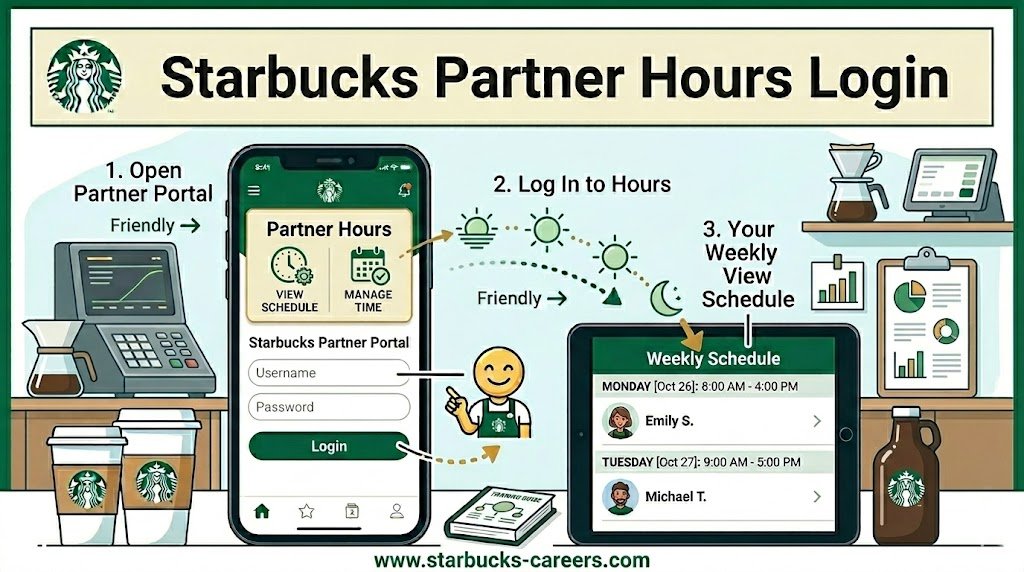
Step-by-Step Login
-
Navigate to partner.starbucks.com
-
Enter your Partner ID and password
-
Complete multi-factor authentication (MFA) if prompted
-
Click Sign In to access your dashboard
Mobile Access
-
The MyPartner App provides on-the-go access to schedules, messages, and limited payroll information
-
Mobile access may vary by country; some features are desktop-only
-
Recommended for quick shift checks and notifications
Troubleshooting Common Issues
-
Reset passwords via the “Forgot Password?” link
-
Clear browser cache or switch devices if login fails
-
Contact local HR for MFA or account issues
Key Features and Tools
Scheduling and Shift Management
| Feature | Description | Tips |
|---|---|---|
| Shift Swap | Exchange shifts with coworkers | Always confirm manager approval |
| Availability Update | Set preferred work hours | Update weekly to avoid scheduling conflicts |
| Store Calendar | See store events and deadlines | Sync with personal calendars |
Payroll and Benefits
-
Access pay stubs and tax documents
-
Track PTO and leave balances
-
Review benefits eligibility and enrollment
2026 Payroll Update: Starbucks has moved all U.S. company-operated store partners to weekly pay starting August 2026. This means you will see weekly pay stubs in Partner Central instead of biweekly. Partner Central is also where you can verify that your deductions are correct during the transition. For the full payroll calendar and pay dates, see our Starbucks Pay Schedule 2026 guide.
Additionally, Starbucks launched the Best of Starbucks Reward in July 2026 — a quarterly performance bonus of up to $300 ($1,200/year) for baristas and shift supervisors when their store meets sales, operational, and customer service targets. Bonus payouts are separate from regular weekly pay and will appear as distinct deposits.
Training and Learning Hub
-
Complete mandatory compliance training
-
Access coffee preparation and customer service modules
-
Track career development programs
Store Communication and Announcements
-
Daily operational updates from management
-
Emergency alerts and store closures
-
Promotions, events, and new product announcements
Partner Central vs. MyPartner Mobile App
| Feature | Partner Central Desktop | MyPartner Mobile App |
|---|---|---|
| Full Payroll Access | ✅ | Limited |
| Shift Management | ✅ | ✅ |
| Training Completion | ✅ | ✅ |
| Announcements | ✅ | ✅ |
| Security Features (MFA) | ✅ | ✅ |
Decision Tip: Use desktop for detailed payroll or benefits management, and mobile for quick access to Starbucks Partner Schedules and notifications.
Benefits of Using Starbucks Partner Central
-
Centralized hub for operational and HR tasks
-
Ensures accurate pay and benefits tracking
-
Reduces administrative errors
-
Supports professional development and career growth
Pros: Streamlined workflow, real-time updates, mobile access
Cons: Some features limited on mobile, dependent on portal uptime
Common Mistakes to Avoid
-
Using outdated login credentials
-
Missing updates or announcements
-
Ignoring mandatory training deadlines
-
Attempting unauthorized access (violates company policy)
Expert Tip: Regularly log in to ensure schedules, pay, and training tasks are current to avoid payroll discrepancies or missed compliance deadlines.
GEO-Aware and Local Considerations
Even globally, some features and communications vary regionally:
-
Local Schedules: Store-level calendars may differ by country
-
Training Modules: Region-specific compliance or certifications
-
Announcements: Local store promotions, closures, or events
-
Search Queries: “Starbucks Partner Central login near [City/Country]” can help partners find store-specific instructions
Decision Framework for Efficient Use
Step 1: Identify your role (Barista, Supervisor, Manager)
Step 2: Check schedules and announcements daily
Step 3: Update availability weekly
Step 4: Complete mandatory trainings promptly
Step 5: Use mobile app for quick notifications and shift swaps
Pricing and Access
-
Access to Partner Central is free for all Starbucks employees
-
Benefits and PTO availability may vary by country
-
Local HR teams provide guidance for regional features
Alternatives and Complementary Tools
-
MyPartner App (mobile version)
-
Starbucks Learning Portal for advanced training modules
-
Regional HR portals for local benefits or compliance updates
Troubleshooting and Security Tips
-
MFA is essential for account security
-
Contact HR immediately if access issues persist
-
Ensure personal devices are secure for mobile access
Step-by-Step Login Troubleshooting Table
| Issue | Solution |
|---|---|
| Forgot Password | Use “Forgot Password?” link and reset credentials |
| MFA Error | Contact HR for authentication reset |
| Browser Issue | Clear cache or switch browser |
| Mobile Access Limitations | Check regional app availability |
Conclusion
Starbucks Partner Central is a robust and centralized portal that empowers partners globally to manage schedules, pay, benefits, and training. By understanding how to navigate the system, leverage its tools, and stay up-to-date with store announcements, partners can optimize their workflow and career progression. Regular use, adherence to training, and careful attention to announcements ensure smooth operations and professional growth.
With the 2026 compensation changes, Partner Central is more important than ever — it’s where you will track your weekly pay stubs, verify deductions during the transition, and monitor your eligibility for the new $1,200 annual performance bonus. For the complete payroll calendar and pay dates, see our Starbucks Pay Schedule 2026 guide.
FAQs
How do I log in to Starbucks Partner Central?
Visit partner.starbucks.com, enter your Partner ID and password, then complete MFA.
Can I access Partner Central on mobile?
Yes, via the MyPartner App. Some features, like full payroll access, are desktop-only.
What features are available in Partner Central?
Schedules, payroll, benefits, PTO, training, announcements, and store communication.
Who can access Partner Central?
Starbucks partners, including baristas, supervisors, managers, and HR personnel.
How do I reset my Partner Central password?
Use the “Forgot Password?” link or contact your local HR team.
Are there GEO-specific differences in Partner Central?
Yes. Training modules, announcements, and schedules can vary by region or store location.
Is Starbucks Partner Central free?
Yes, all Starbucks partners have free access to the portal.
What should I do if I miss a shift or update?
Check the portal immediately, notify your manager, and adjust your schedule or availability if needed.
Can I swap shifts using Partner Central?
Yes. Use the shift swap feature, but always confirm with your store manager.
What are common mistakes to avoid?
Using outdated credentials, missing updates, ignoring training deadlines, and unauthorized access.
What’s the difference between desktop and mobile access?
Desktop offers full payroll, training, and schedule management; mobile is best for notifications, messages, and quick schedule checks.
How does Partner Central support career development?
Through training modules, certification tracking, and role-specific dashboards that guide progression.
Is MFA required for Starbucks Partner Central?
Yes, MFA enhances security and ensures only authorized partners access the portal.
Where can I find local store announcements?
In your Partner Central dashboard under the store communications section or via the mobile app notifications.
Who manages Starbucks Partner Central access?
Local HR teams and store managers oversee access, updates, and troubleshooting.
How often does Starbucks pay employees through Partner Central?
As of August 2026, all U.S. company-operated store partners are paid weekly on Fridays. You can view your weekly pay stubs through Partner Central. For the full payroll calendar, see our Starbucks Pay Schedule 2026 guide.